MCP Servers
MCP Servers let you connect your Optimly employees to any external platform that speaks the Model Context Protocol. Once registered, every employee in your workspace can discover and call the server's tools automatically during conversations.
What is MCP?
The Model Context Protocol is an open standard for exposing tools to AI agents over HTTP. An MCP server advertises a list of callable functions (tools) along with their input schemas. Agents discover those tools at runtime and call them as needed during the conversation loop.
Optimly uses the Streamable HTTP transport — a single POST endpoint that accepts JSON-RPC 2.0 requests.
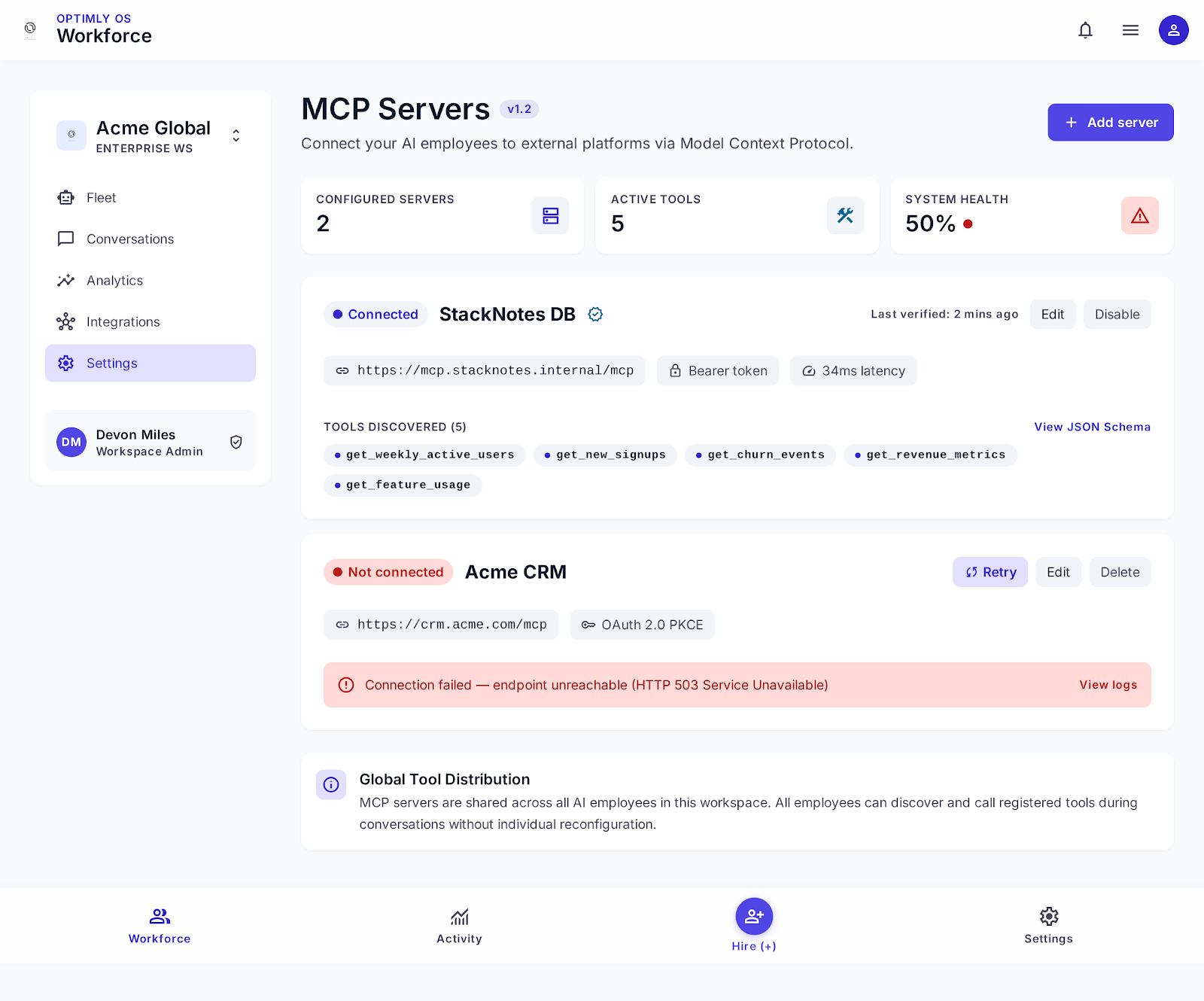
Managing MCP Servers
Go to Dashboard → MCP Servers to add, edit, or remove servers.
Adding a server
Click Add server and fill in the following fields:
| Field | Required | Description |
|---|---|---|
| Name | ✅ | Human-readable label, e.g. "GitHub Tools" |
| Description | — | Optional note for your team |
| URL | ✅ | Base URL of the MCP server (the POST endpoint) |
| Auth type | ✅ | none, bearer, or api_key |
| Auth header | api_key only | Header name, e.g. X-API-Key |
| Token / Key | bearer or api_key | Secret credential (never returned in reads) |
Editing a server
Click the pencil icon on any server. Leave the token/key field blank to keep the existing credential unchanged.
Enabling / disabling
Each server has an active toggle. Inactive servers are skipped during tool discovery — useful for temporarily removing a server without deleting it.
How Agents Use MCP Tools
When a conversation starts, the employee:
- Discovers tools — calls
tools/liston each active MCP server registered to your account. - Injects tools — merges the discovered tools with built-in capabilities (knowledge retrieval, lead capture, email handoff, etc.).
- Calls tools as needed — during the ReAct loop, the employee invokes
tools/callwhenever a user request requires it.
The employee identifies each tool by a namespaced name (mcp_<server_id>_<tool_name>) so tool names never clash across servers.
All employees in your workspace share the same set of MCP servers. Per-employee server assignment is planned for a future release.
Authentication
| Auth type | How it works |
|---|---|
| none | No auth header sent |
| bearer | Sends Authorization: Bearer <token> |
| api_key | Sends <auth_header>: <auth_value> (e.g. X-API-Key: secret) |
Credentials are stored securely and sent on every request to the server. They are never returned in API read responses (GET /user/mcp-servers).
MCP Server Requirements
Your server must implement the Streamable HTTP transport:
tools/list — advertise available tools
POST /mcp
Content-Type: application/json

{"jsonrpc":"2.0","method":"tools/list","id":1}
Expected response:
{
  "jsonrpc": "2.0",
  "result": {
    "tools": [
      {
        "name": "get_customer",
        "description": "Look up a customer record by email address",
        "inputSchema": {
          "type": "object",
          "properties": {
            "email": { "type": "string", "description": "Customer email" }
          },
          "required": ["email"]
        }
      }
    ]
  },
  "id": 1
}
tools/call — execute a tool
POST /mcp
Content-Type: application/json

{
  "jsonrpc": "2.0",
  "method": "tools/call",
  "params": {
    "name": "get_customer",
    "arguments": { "email": "alice@example.com" }
  },
  "id": 2
}
Expected response:
{
  "jsonrpc": "2.0",
  "result": {
    "content": [
      { "type": "text", "text": "Customer: Alice Smith, Plan: Pro, Since: 2024-01" }
    ],
    "isError": false
  },
  "id": 2
}
If isError is true, Optimly surfaces the error content back to the employee so it can respond gracefully.
Popular MCP Servers
The MCP ecosystem has ready-made servers for many platforms:
| Platform | What your agents can do |
|---|---|
| GitHub | Open issues, read PRs, search code, list repos |
| Notion | Query pages, create notes, update databases |
| Slack | Post messages, read channels, search conversations |
| Jira | Create tickets, update status, query sprints |
| Linear | Create issues, update priorities |
| Google Drive | Read and write documents, list files |
| Postgres / SQLite | Run read queries against your database |
| Any REST API | Wrap any HTTP API as an MCP server |
Community-maintained server lists: modelcontextprotocol.io/servers · github.com/punkpeye/awesome-mcp-servers
Building a Custom MCP Server
Wrapping an internal API takes around an hour. The minimum implementation:
# Minimal Python MCP server (FastAPI example)
from fastapi import FastAPI
from pydantic import BaseModel
from typing import Any, Optional

app = FastAPI()

TOOLS = [
    {
        "name": "get_order_status",
        "description": "Get the current status of a customer order",
        "inputSchema": {
            "type": "object",
            "properties": {"order_id": {"type": "string"}},
            "required": ["order_id"],
        },
    }
]

class RpcRequest(BaseModel):
    jsonrpc: str
    method: str
    id: int
    params: Optional[dict] = None

@app.post("/mcp")
async def mcp(req: RpcRequest):
    if req.method == "tools/list":
        return {"jsonrpc": "2.0", "result": {"tools": TOOLS}, "id": req.id}

    if req.method == "tools/call":
        name = req.params["name"]
        args = req.params["arguments"]
        if name == "get_order_status":
            # call your real backend here
            status = lookup_order(args["order_id"])
            return {
                "jsonrpc": "2.0",
                "result": {"content": [{"type": "text", "text": status}], "isError": False},
                "id": req.id,
            }

    return {"jsonrpc": "2.0", "error": {"code": -32601, "message": "Method not found"}, "id": req.id}
Deploy it anywhere with an HTTPS endpoint, register the URL in Optimly, and your agents immediately have access.
API Reference
List MCP servers
GET /user/mcp-servers
Authorization: Bearer <token>
Create an MCP server
POST /user/mcp-servers
Authorization: Bearer <token>
Content-Type: application/json

{
  "name": "GitHub Tools",
  "url": "https://mcp.example.com/mcp",
  "auth_type": "bearer",
  "auth_value": "ghp_xxx"
}
Update an MCP server
PATCH /user/mcp-servers/{mcp_server_id}
Authorization: Bearer <token>
Content-Type: application/json

{
  "is_active": false
}
Delete an MCP server
DELETE /user/mcp-servers/{mcp_server_id}
Authorization: Bearer <token>
Troubleshooting
Tools not appearing in conversations
- Check that the server is marked Active in the dashboard.
- Verify the URL is reachable from the Optimly backend (not
localhost). - Confirm
tools/listreturns a non-emptytoolsarray.
Tool calls failing
- Check server logs for incoming
tools/callrequests. - Verify the auth credentials are correct (re-enter them in Edit mode).
- Ensure
tools/callreturns thecontentarray withisError: false.
Timeout errors
- Optimly waits up to 30 seconds per tool call. Ensure your server responds within that window.
- For slow operations, return a job ID and expose a polling tool instead.
Scheduling recurring MCP tasks
Employees can schedule themselves to run on a recurring basis — useful for an Analytics Reporter that queries a database every Monday and emails a digest.
To set up a recurring task, open a conversation with your employee and tell it:
"Run the weekly digest every Monday at 9am UTC and email the results to management@yourcompany.com"
The employee calls the built-in schedule_task tool internally, which creates a cron job (0 9 * * 1). The scheduler invokes the employee with that instruction every Monday at 9am — no external cron, no webhook.
To cancel or change the schedule, open a new conversation:
"Cancel the weekly digest" or "Change the weekly digest to Fridays at 8am UTC"
→ See the full setup walkthrough in Example: SaaS AI Workforce Fleet