Top LLMOps Dashboards for B2B SaaS Chatbots: The Conversation Quality Metrics That Actually Matter

It started with a Slack message from your head of sales.
"Hey — did anyone follow up on that pricing conversation from Tuesday? The one where the guy asked about enterprise contracts four times?"
You pull up the chatbot logs. Sure enough: a high-intent lead landed on your pricing page, opened the widget, and asked the same question four different ways over six minutes. The bot gave the same generic answer every time. The user left. That was 72 hours ago.
You had no alert. No flag. No dashboard row that said "this conversation is dying and someone should intervene." You had token counts and latency percentiles — but nothing that told you a potential $40K ARR conversation had just walked out the door.
This is the measurement gap that LLMOps tools built for engineers don't close. LangSmith shows you the prompt trace. Arize Phoenix shows you your embedding drift. Helicone shows you your p95 latency. All of that is genuinely useful — for the ML engineer who owns the model. But none of it answers the question the founder asks on Monday morning: is this chatbot winning or losing deals?
This article is about the other category of LLMOps dashboard — the one built for business teams, not engineering teams. And specifically, about the six conversation quality dimensions that Optimly tracks out of the box for B2B SaaS chatbots.
Why Engineering LLMOps Tools Don't Answer Business Questions
There are two tiers of LLMOps tooling, and most teams only discover the distinction after they've already deployed.
The engineering tier — LangSmith, Arize Phoenix, Helicone, Datadog's LLM observability layer — is designed for ML engineers and data scientists. These tools are excellent at what they do: tracing individual prompt-response pairs, tracking token latency, flagging hallucinations at the model level, and running evaluation harnesses against test datasets. If your chatbot just responded with a confidently wrong fact, these are the tools that help you find the bad prompt and fix it.
The business tier is a different problem entirely. The business stakeholder — the founder, the head of CS, the RevOps lead — doesn't care about the span duration of a LangChain RetrievalQA call. They care about:
- Did the user get their question answered, or did they leave frustrated?
- Which conversations ended with a captured lead, and which ended with silence?
- Where in a conversation do users most commonly drop off?
- When a high-value enterprise prospect showed frustration signals, did anyone know in time to intervene?
These are conversation-level questions, not model-level questions. And no amount of trace debugging will surface them.
| Capability | LangSmith | Arize | Helicone | Optimly |
|---|---|---|---|---|
| Prompt trace / span debugging | ✅ | ✅ | ✅ | ➖ |
| Token cost per interaction | ✅ | ✅ | ✅ | ✅ |
| Conversation sentiment trending | ❌ | ➖ | ❌ | ✅ |
| Frustration & anomaly detection | ❌ | ❌ | ❌ | ✅ |
| Resolution status & dropoff point | ❌ | ❌ | ❌ | ✅ |
| Lead capture tracking | ❌ | ❌ | ❌ | ✅ |
| Manual mode — human takeover | ❌ | ❌ | ❌ | ✅ |
| AI-generated insight summaries | ❌ | ➖ | ❌ | ✅ |
| Scheduled PDF reports (email) | ❌ | ❌ | ❌ | ✅ |
| Multi-channel (WhatsApp, web, email) | ❌ | ❌ | ❌ | ✅ |
| Primary user | ML Engineer | Data Scientist | Developer | Founder / CS Lead |
If your chatbot is a growth asset — not just a tech experiment — you need the second tier. Here is exactly what it looks like inside Optimly.
What "Conversation Quality" Actually Means in Optimly's Dashboard
Optimly models every conversation across six dimensions. Each dimension is stored as structured data per chat session and surfaced in real-time dashboards. Together they give you a complete quality picture — not just "was the user satisfied?" but why, when, and what to do about it.

1. Sentiment & Emotion Trending
What Optimly measures: Every conversation gets an avg_sentiment_trend score (a float between 0 and 1, where higher is more positive) and a dominant_emotion label — joy, frustration, anger, confusion, neutral, and others derived from the message content across the full session.
What the dashboard shows: A sentiment distribution view breaks your conversation volume into Positive, Neutral, and Negative buckets for any date range you select. An emotion distribution bar chart ranks the top emotions by frequency across all sessions. For individual conversations, a per-session sentiment timeline shows how mood shifted turn by turn — so you can see exactly which bot response triggered the decline.
Why it matters for B2B SaaS: Sentiment is a leading indicator of churn, not a lagging one. If the conversations on your pricing page are trending neutral-to-negative week over week, that's a funnel leak you can actually point to and fix. If "confusion" is the dominant emotion on your integrations FAQ page, that's a docs gap — not a chatbot problem. If "joy" spikes after a specific agent response, that's a pattern worth understanding and scaling. Most teams discover these patterns months late, in a CSAT survey. Optimly surfaces them in real time.
2. Frustration & Anomaly Detection
What Optimly measures: This is where Optimly starts behaving less like a reporting tool and more like an early-warning system. Every conversation is scanned for anomaly signals, each logged as a ChatAnomalies record with an anomaly_type, a severity level from 1 to 5, and a detection_time timestamp.
The anomaly types Optimly flags include:
- Repetition: The user sends the same question or a close variant more than once — the clearest signal that the bot failed to answer
- Abandonment: The session ends immediately after a bot response, with no user follow-up — high correlation with frustration
- Negative tone spike: A sharp shift toward angry or hostile language mid-conversation
- Hesitation: Long delays between user messages, or short clarification attempts that don't resolve — detected via the
hesitation_detectionsignal in the conversation flow model
What the dashboard shows: Live conversations with active anomalies surface at the top of the conversation list with severity badges. You can sort and filter by anomaly type, severity, and time window. A heatmap view shows when anomaly spikes tend to cluster — useful for identifying whether a bad prompt deployment caused a specific afternoon of high-severity events.
Why it matters for B2B SaaS: This is the most operationally valuable dimension for B2B teams. A severity-5 frustration flag on an enterprise prospect mid-pricing conversation is not a metric to review in next week's report — it's a moment to act on right now. Which leads to the next dimension.
3. Resolution Status & Engagement Scoring
What Optimly measures: At the end of every conversation, Optimly assigns a resolution_status — one of resolved, unresolved, or escalated. It also computes an engagement_score (a composite 0–1 signal that weighs message depth, turn-taking, and session length) and a dropoff_point (the index of the last user message before disengagement, or -1 if the conversation completed).
An escalation_event flag marks any conversation where the user requested or was transferred to a human — valuable both as a quality signal and as a cost signal.
What the dashboard shows:
- A resolution funnel showing what percentage of conversations resolve, go unresolved, or escalate — with trend lines over time
- An engagement vs. sentiment scatter plot where each dot is a conversation, letting you spot the cluster of "low engagement + negative sentiment" sessions that represent your worst-performing flows
- A dropoff heatmap: across all conversations, which message turn number sees the highest abandonment? If message turn 3 is your dropoff spike, that's the exact bot response to investigate
Why it matters for B2B SaaS:
Resolution rate is your self-serve success rate. In a B2B SaaS context, an unresolved conversation often becomes a support ticket, a delayed deal, or a silently churned user. Optimly's resolution tracking lets you calculate the actual deflection value of your chatbot — which is how you justify the budget at the next board meeting.
The dropoff point is particularly actionable. Most teams who look at this data for the first time discover that a disproportionate number of users are abandoning after a single specific bot response. That one response — often a confident-sounding non-answer — is worth rewriting immediately.
4. Topic & Intent Intelligence
What Optimly measures: Each conversation is analyzed for its dominant_topic (the primary subject across all user messages), topic_diversity (how many distinct subjects appeared), topic_shifts (how many times the conversation changed topic), and intent_shifts (how many times the user's underlying goal appeared to change). The turn_taking_ratio measures conversational balance — the ratio of user turns to assistant turns.
What the dashboard shows:
- A ranked list of topics by conversation frequency — your chatbot's organic keyword research
- Topic shift frequency as a conversation complexity signal: high shifts often correlate with low resolution
- An intent flow visualization showing which topics users pivot from and to
Why it matters for B2B SaaS: Topic frequency data is product roadmap intelligence that most teams are throwing away. If "Salesforce integration" appears in 38% of pricing-page conversations, that's not a support question — that's an unblocked sales objection. If topic_diversity is high and resolution_status is low, your bot is being asked things outside its knowledge base: that's a content gap, not a model failure.
The turn_taking_ratio is a subtle but powerful signal. A ratio heavily skewed toward user turns means the bot is producing short, unsatisfying answers that force users to keep probing. A balanced ratio — user asks, bot answers fully, user asks next question — is the pattern of conversations that end in resolved.
5. Manual Mode — The Human-in-the-Loop Layer
What Optimly provides: This is not a passive metric. It's an active control surface built into the dashboard — and the feature that transforms Optimly from a reporting tool into a revenue tool.
When the dashboard shows a frustration flag, a high-value topic ("enterprise," "custom contract," "pricing"), or a conversation that's clearly going sideways, any authorized team member can take over the conversation with one click.
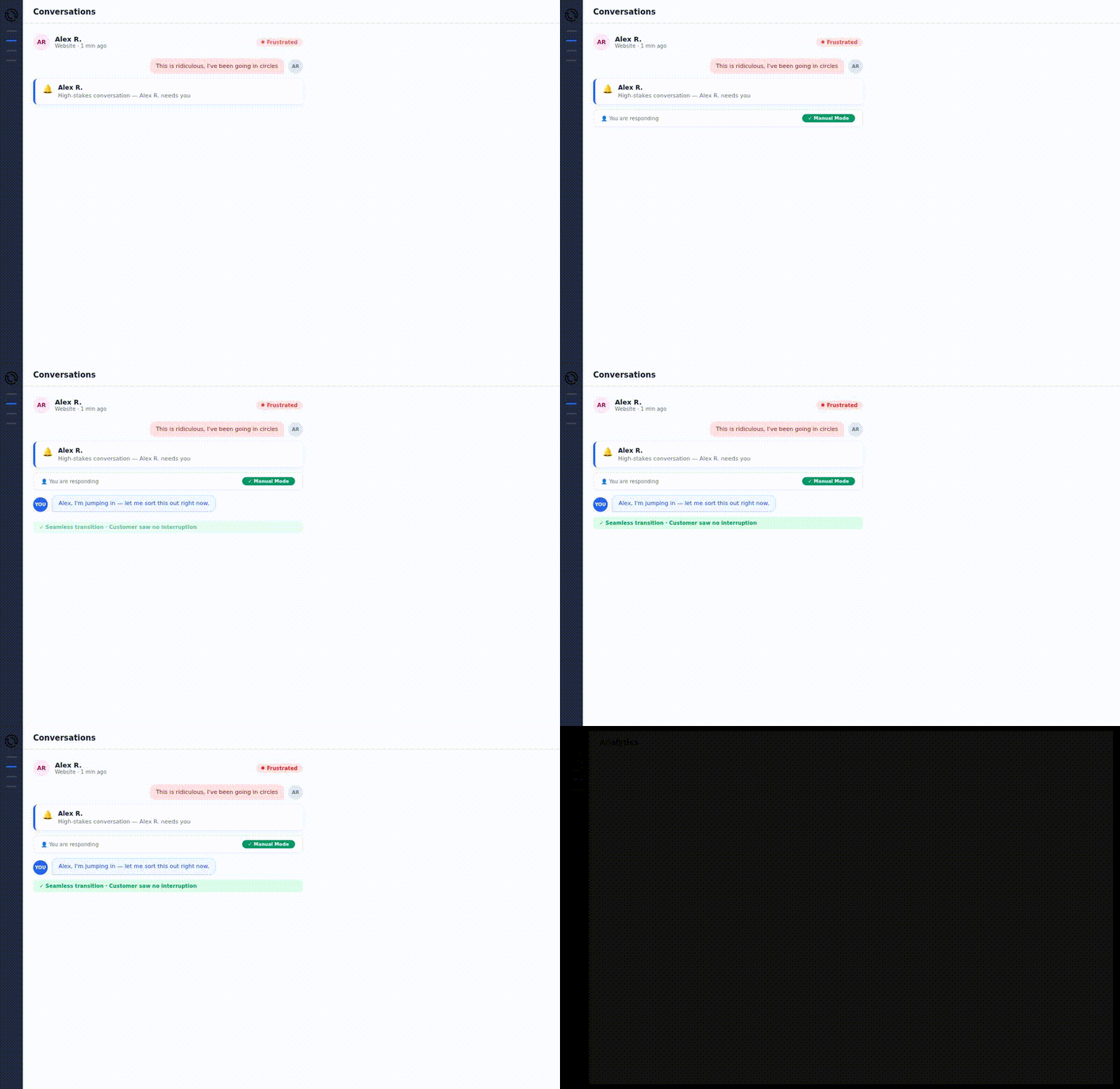
Here is the exact flow:
- The dashboard shows a live conversation with a severity-4 anomaly: the user has rephrased their pricing question three times
- A sales lead on the team spots the ping notification
- One click activates Manual Mode for that specific conversation — the
ai_enabledflag flips tofalse - The AI is silenced immediately. The sales lead types directly into the Optimly interface
- The user, on their end, sees a seamless continuation of the chat on their channel — web widget, WhatsApp, or email. There is no interruption, no "you are being transferred" message
- The sales lead answers the custom pricing question, books the demo on the spot, handles the objection
- Manual Mode is toggled off. The AI resumes with full context of everything that was said in the manual exchange
At the agent configuration level, auto_respond_enabled controls whether new conversations start in AI mode or manual mode by default — useful in the early weeks of deployment when teams want to review all conversations before fully automating.
Why it matters for B2B SaaS: The 20% of conversations that drive 80% of your chatbot's revenue impact need human judgment. Manual Mode makes that intervention instant and invisible. And critically, every manual intervention creates a transcript that shows exactly what the AI missed — which feeds directly back into knowledge base improvements, closing the quality loop one deal at a time.
6. Lead Capture & Business Outcome Attribution
What Optimly measures: Every conversation carries a lead_collected flag. When a user submits their contact information during a chat — through Optimly's built-in lead capture flow — the flag flips to true and the lead data is recorded alongside the full conversation context.
A dynamic LeadCaptureState model tracks the state machine of each capture attempt per conversation: initiated, in progress, completed, or abandoned. This lets you see not just how many leads were captured, but where in the funnel users dropped out of the lead flow.
What the dashboard shows:
- Lead capture rate as a percentage of total conversations — your chatbot's conversion rate
- Lead capture by channel: web widget vs. WhatsApp vs. email, so you know which placements are performing
- A conversation-to-lead funnel showing how many messages a typical successful capture takes
- CRM attribution: pass the
conversation_idinto HubSpot or Salesforce to track captured leads all the way to opportunity won
Why it matters for B2B SaaS: This is the dimension that turns the chatbot from a cost center into a revenue line item. When you can show that 23% of pricing-page conversations result in a captured lead — and that chatbot-attributed leads close at a 15% higher rate because they're better qualified — you've answered every "is this chatbot worth it?" question for the next four quarters.
Beyond Quality: The Operational Dashboard Layer
The six dimensions above tell you what's happening in your conversations. Three additional capabilities tell you what it's costing, what it means, and how to stay informed without living in the dashboard.
Token Cost Tracking
Every message in Optimly generates a TokenUsageRecord linked to the specific message and agent. The dashboard surfaces this as a daily token spend trend, a per-agent cost breakdown, and — most importantly — a cost-per-resolved-conversation metric.
Cost-per-resolution is the key ROI metric for LLM chatbot programs. If your chatbot resolves 500 support queries per month at an average cost of $0.04 per conversation, and your human support cost is $12 per ticket, the deflection math writes itself. Optimly gives you the numerator and denominator to run that calculation without building a custom data pipeline.
AI-Generated Insight Summaries
Rather than leaving founders to interpret raw metrics, Optimly's scheduler generates periodic AgentInsight records — narrative, JSON-encoded insight lists that surface the so what in plain language.
An example insight might read: "Users on the integrations page are frequently asking about Salesforce data sync limits, which the current knowledge base doesn't address. 31% of these sessions ended unresolved over the past 7 days." That's not a metric — it's an action item. The insight tells you exactly what to add to your knowledge base and why.
Insights are versioned and time-windowed, so you can compare insight quality over time and verify that issues you fixed actually improved.
Scheduled PDF Reports
Not everyone checks the dashboard daily. Optimly's scheduler delivers email reports via Brevo on a cadence you configure — daily, weekly, or monthly. Each report includes conversation volume, sentiment trends, resolution rate, lead capture rate, token costs, and top anomalies.
For B2B SaaS teams with investors or executive stakeholders, this is the feature that makes chatbot performance visible to the whole company without requiring anyone to log in. The report is exec-ready, shareable, and requires zero manual work to produce.
How to Turn Your Chatbot Into a Measurable Growth Asset
If you're currently running a chatbot without visibility into any of the six dimensions above, the gap between where you are and where you could be is smaller than you think. Optimly layers on top of whatever you've already built — no rebuild, no migration.
Step 1: Connect your agent. Optimly works with any LLM provider — OpenAI, Anthropic, Google Gemini, and custom models — via API. Your chatbot keeps running as-is; Optimly observes and analyzes the conversations it produces.
Step 2: Enable quality tracking. Conversation metrics, anomaly detection, sentiment analysis, and lead capture tracking activate automatically on the first conversation. The dashboard populates in real time.
Step 3: Set up alerts and reports. Configure frustration alerts so you're notified when a severity-4+ anomaly fires on a live conversation. Enable weekly email reports so your team sees the performance summary in their inbox every Monday without opening the dashboard.
Within the first week, you'll have data you've never had before: which conversations are dying and why, what topics your users actually care about, and exactly how many leads your chatbot is generating.
Frequently Asked Questions
What is an LLMOps dashboard? An LLMOps dashboard monitors the operational performance of applications built on large language models. Engineering-focused dashboards like LangSmith and Arize track prompt traces, model behavior, and evaluation harnesses. Business-focused dashboards like Optimly track conversation quality, user outcomes, and revenue impact — the metrics that matter for non-engineering stakeholders.
How is Optimly different from LangSmith for B2B SaaS teams? LangSmith is built for ML engineers debugging prompt pipelines — it's excellent for that purpose. Optimly is built for B2B SaaS founders and CS teams who need to know whether the chatbot is resolving issues, capturing leads, and avoiding deal-losing frustration loops. The two tools serve different users and answer different questions. For a B2B growth team, Optimly is the relevant layer.
What conversation quality metrics matter most for B2B SaaS chatbots? The six that move the needle are: sentiment trend, frustration and anomaly detection, resolution status with dropoff point, topic and intent intelligence, manual takeover capability, and lead capture rate. Optimly tracks all six out of the box and surfaces them in a single dashboard without requiring custom instrumentation.
How does Optimly detect frustration in conversations? Optimly's anomaly detection layer flags four signal types in real time: repetition (the user re-asks the same question), abandonment (session ends immediately after a bot response), negative tone spikes (rapid shift to hostile language), and hesitation (short, unresolved clarification attempts). Each anomaly is scored by severity so CS teams can triage by urgency and intervene on the highest-stakes conversations first.
Can Optimly attribute chatbot conversations to pipeline and revenue?
Yes. Every conversation carries a lead_collected flag that marks when a user submits contact information during the chat. Combined with CRM integration — passing the conversation ID into HubSpot or Salesforce — teams can track the full funnel from first chatbot message to opportunity won, and calculate the chatbot's direct contribution to pipeline.