The AI Safety Net: Why We Built Manual Mode (And How It Saves Deals)

There's a nightmare scenario every founder has when they first deploy an LLM agent: The Loop.
You know the one. A potential customer asks a nuanced question about pricing. The AI doesn't quite have the context in its RAG documents, so it gives a generic answer. The customer clarifies. The AI repeats the generic answer. The customer gets frustrated. The AI apologizes... and repeats the answer again.
In the past, you would see this in your logs 24 hours later—a lost lead, a churned user, a missed opportunity.
At Optimly, our mission has always been to close the gap between "deployment" and "understanding". But we realized that seeing the car crash in real-time isn't enough. You need to be able to grab the wheel.
Introducing Manual Mode: The "Human-in-the-Loop" You Actually Control
Most companies deploy AI models without a clear understanding of how users interact with them or what problems they encounter. While Optimly has always acted as the "Google Analytics" for these interactions, we recognized that analytics alone has a fundamental limitation: it's passive.
Our analytics engine excels at detecting anomalies in real-time:
- Repetition: When a user asks the same question multiple times
- Frustration: When language indicates confusion or anger
- Abandons: When a user leaves after a specific response
- Knowledge Gaps: When your agent doesn't have the right information
Previously, these "flags" served as a post-mortem. You'd look at the dashboard and say, "Ouch, we lost that one."
Today, we're changing that.
The Problem with "Black Box" Automation
Here's the uncomfortable truth: No matter how well you configure your AI agent, it will fail. Not because the technology is bad, but because:
- Real users are unpredictable - They ask questions you never anticipated
- Context is everything - A slight misunderstanding compounds into confusion
- High-stakes conversations need judgment - Enterprise pricing, custom contracts, and escalations require human nuance
- Knowledge bases have gaps - You can't document everything on day one
The traditional solution? Build more guardrails. Add more documents. Retrain. Iterate. Repeat.
But what about the conversations happening right now?
That's where Manual Mode comes in.
How Manual Mode Works
We've added a new layer of total control to your agent configuration. Think of it as a "mission control" for your AI conversations.
The Workflow
1. Monitor
You (or your support team) keep an eye on the Optimly Live Dashboard. Conversations flow in real-time, with AI handling most interactions automatically.
2. Detect
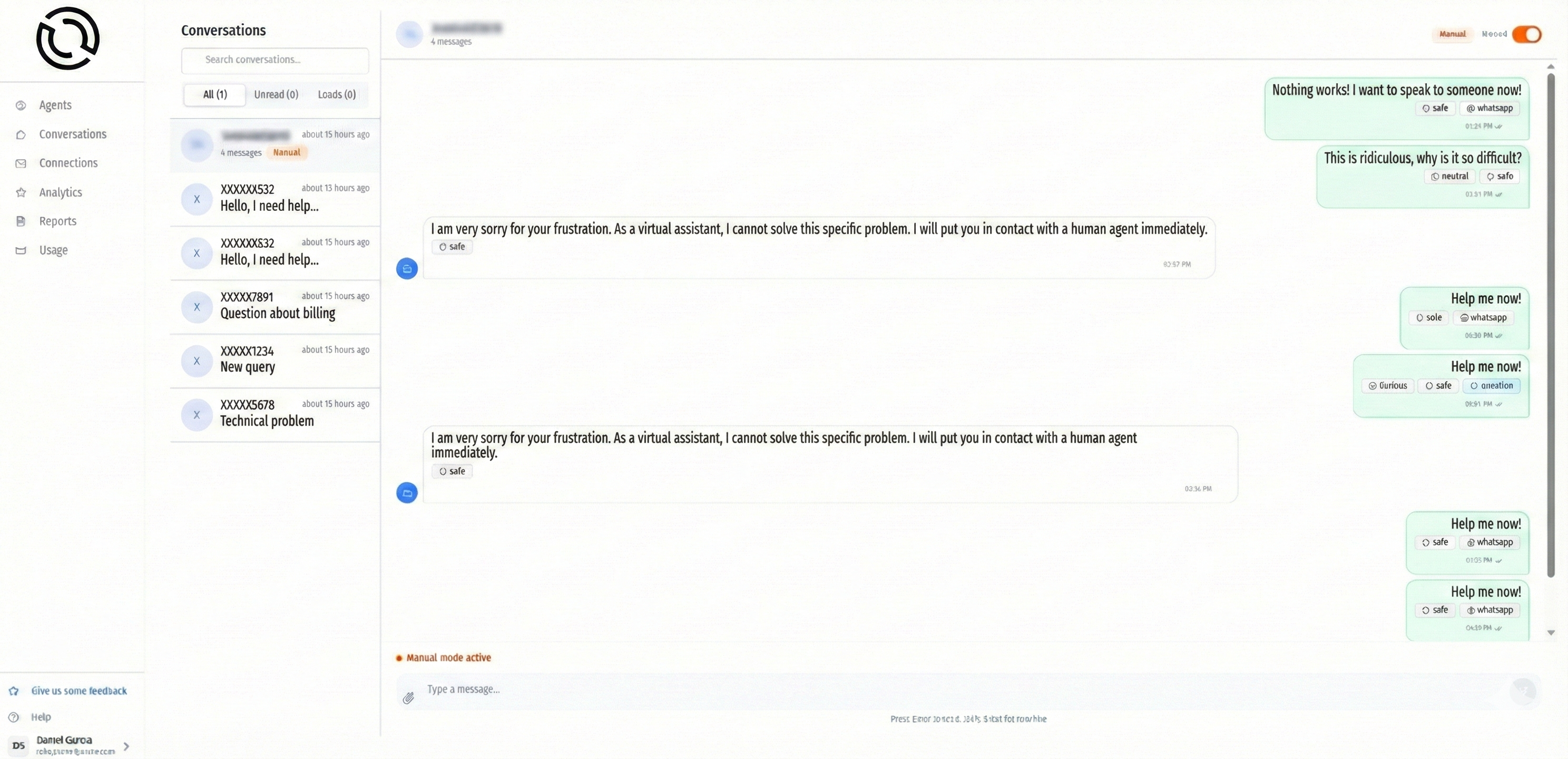
You see a "Frustration Flag" pop up on a high-value conversation. Or maybe you notice a potential enterprise lead asking about custom pricing.
3. Takeover
With one click, you toggle Manual Mode for that conversation.
4. Interact
The AI is instantly silenced. You type directly to the user through the Optimly interface. The user sees a seamless continuation of the chat on WhatsApp, your website, or email—they have no idea a human just stepped in.
5. Resume
Once you've resolved the complex issue or closed the sale, you toggle Manual Mode off. The AI reads the context of what you just wrote and continues the conversation naturally.
Key Features
✅ One-click takeover - No configuration needed
✅ Seamless handoff - Users never know you switched
✅ Multi-channel support - Works on website, WhatsApp, email, SMS
✅ Context preservation - Full conversation history maintained
✅ Instant resume - AI picks up exactly where you left off
3 Scenarios Where Manual Mode Wins
Automation is perfect for the 80% of routine queries. Manual Mode is for the 20% that actually drive revenue.
1. The High-Ticket Closing 💰
Your agent is brilliant at explaining features, but it might struggle with negotiation nuance.
The Scenario:
You see a user asking about "Enterprise pricing" or "Custom contracts" in your dashboard. You definitely don't want an LLM hallucinating a discount or making unauthorized commitments.
The Manual Mode Move:
A founder or sales lead steps in immediately, has a real conversation, books the demo call, and personally manages the relationship. The AI handled the qualification; you handle the close.
Real Result: One Optimly customer saved a $50K/year deal that their bot was about to lose by offering an incorrect pricing tier.
2. The "Knowledge Gap" Rescue 📚
Sometimes, users ask about things your RAG (Retrieval-Augmented Generation) system doesn't know yet—a new feature you just shipped, an edge case, or a competitor comparison.
The Scenario:
Instead of the bot saying "I don't have that information" three times (triggering frustration), you spot the repetition flag in your dashboard.
The Manual Mode Move:
You step in, answer the question with the correct information, and—crucially—add that information to your Knowledge base afterward so the AI handles it correctly next time.
Real Result: This is how you turn failures into improvements in real-time.
3. De-escalating Frustration 😤
Optimly automatically flags language that indicates confusion or frustration. Phrases like "This isn't working," "I want to speak to a person," or repeated questions trigger alerts.
The Scenario:
A user is clearly frustrated after three failed attempts to get help. Your agent might be configured to deflect or loop—but that's gasoline on the fire.
The Manual Mode Move:
You honor their request instantly without them ever leaving the chat window. You solve their problem with empathy and context, turning a potential detractor into a promoter.
Real Result: Customer retention often comes down to these moments. Manual Mode ensures you never miss them.
The "Monitor & Rescue" Workflow
Manual Mode completes the cycle of Continuous Optimization that Optimly was built for.
graph LR
    A[Deploy Agent] --> B[Analyze Interactions]
    B --> C[Detect Issues]
    C --> D[Manual Rescue]
    D --> E[Update Knowledge]
    E --> A
Step 1: Deploy
Launch your agent using OpenAI, Anthropic, Google Gemini, or your preferred LLM provider. Configure it with your knowledge base and let it handle customer conversations.
Step 2: Analyze
Let Optimly capture every event, flag anomalies, and surface patterns. Our analytics engine works 24/7 monitoring sentiment, topics, frustration, and engagement.
Step 3: Rescue
Use Manual Mode to save individual conversations in real-time. Don't wait for the post-mortem—grab the wheel when you see trouble.
Step 4: Improve
Use the transcripts from your manual interventions to:
- Rewrite your prompts for better responses
- Update your Knowledge documents with missing information
- Identify edge cases that need special handling
- Train your team on common scenarios
This is the loop: Deploy → Analyze → Rescue → Improve → Deploy better.
Don't Just Build a Bot. Build a System.
The goal of AI isn't to replace humans entirely; it's to scale them intelligently.
Manual Mode ensures that while your AI handles scale (hundreds or thousands of conversations), you never lose the human touch when it matters most:
- The enterprise deal worth $100K
- The frustrated customer one bad experience from churning
- The edge case your documentation doesn't cover yet
- The nuanced question that requires judgment, not retrieval
Think of it like this:
| Without Manual Mode | With Manual Mode |
|---|---|
| 🤖 Bot says something wrong → 😞 Customer leaves | 🤖 Bot says something wrong → 🚨 Alert → 👤 You step in → ✅ Deal saved |
| 📊 See the problem tomorrow | ⚡ Fix the problem now |
| 🔁 Keep repeating the same mistakes | 📈 Improve with every intervention |
| ⚖️ Choose: automation OR quality | 🎯 Get both: automation AND quality |
Real Talk: When Should You Use Manual Mode?
Manual Mode isn't for every conversation. Here's our guidance:
✅ DO use Manual Mode for:
- Enterprise sales conversations
- Frustrated or confused users (flagged by Optimly)
- VIP customers or high-value accounts
- Questions outside your current knowledge base
- Situations requiring empathy or judgment
- Learning phase (first few weeks of deployment)
❌ DON'T use Manual Mode for:
- Routine FAQs your agent handles well
- High-volume, low-stakes interactions
- After-hours when no one is available (let AI work 24/7)
- Conversations where the AI is performing correctly
Pro Tip: Most customers start with Manual Mode on by default for the first week, then gradually enable full automation as they gain confidence in their agent's performance.
Technical Deep Dive: How It Actually Works
For the developers and technical PMs reading this, here's what's happening under the hood:
Agent-Level Configuration
// Set your default mode for all new conversations
const agentConfig = {
  auto_respond_enabled: false  // Start in manual mode
}
When auto_respond_enabled: false, all new conversations wait for manual responses. This is perfect during your learning phase.
Per-Conversation Override
// Create a conversation in manual mode
const chat = await fetch('https://api.optimly.io/external/chat', {
  method: 'POST',
  headers: { 'Authorization': 'Bearer YOUR_TOKEN' },
  body: JSON.stringify({
    client_id: 'user_123',
    ai_enabled: false  // This specific conversation needs manual control
  })
});
Sending Manual Responses
// You send the message through Optimly's API
const response = await fetch('https://api.optimly.io/external/message/new-message', {
  method: 'POST',
  body: JSON.stringify({
    chat_id: 'chat_abc123',
    sender: 'assistant',
    content: 'Thanks for your patience! Here\'s the custom pricing...'
  })
});
The user receives your message through their original channel (WhatsApp, website widget, email, etc.) with zero friction.
Dashboard Toggle
For non-technical team members, it's even simpler:
- Open the conversation in your Optimly dashboard
- Click the AI/Manual toggle switch
- Start typing
That's it. No APIs, no code, no complexity.
Real Customer Stories
Case Study: SaaS Company Saves $250K in ARR
A B2B SaaS company using Optimly noticed their AI was struggling with custom enterprise pricing questions. Before Manual Mode, these conversations would end with "Let me have someone reach out to you"—but no one would, and the leads went cold.
After implementing Manual Mode:
- Sales team monitors high-value conversations flagged by Optimly
- When enterprise pricing comes up, sales rep takes over instantly
- Closes deals in the chat window, books demos on the spot
- Result: 5 enterprise deals closed in the first month ($250K ARR)
Case Study: E-commerce Store Reduces Refunds 40%
An e-commerce company saw high frustration scores in their support conversations. Customers with order issues would get stuck in bot loops, get angry, demand refunds, and leave bad reviews.
After implementing Manual Mode:
- Support team sees frustration flags in real-time
- Takes over conversations showing repetition patterns
- Resolves issues with empathy and custom solutions
- Result: 40% reduction in refund requests, 4.8★ support rating
Getting Started with Manual Mode
Manual Mode is available today for all Optimly users. Here's how to enable it:
1. Configure Your Agent Default
In your agent's Configuration tab:
- Choose Automatic AI Responses (let AI handle everything)
- Or choose Manual Mode by Default (review all conversations)
Most users start manual, then gradually enable automation.
2. Set Up Alerts
Configure Optimly to notify you when:
- Frustration is detected
- Repetition occurs
- High-value keywords appear ("enterprise," "custom," "pricing")
- Conversations exceed certain lengths
3. Monitor & Intervene
Keep your Optimly dashboard open (or use mobile notifications). When you see a conversation that needs attention, click to take over.
4. Optimize Continuously
After each manual intervention:
- Add missing information to your Knowledge base
- Update your agent's prompt if needed
- Document edge cases for your team
- Watch the AI handle it better next time
The Philosophy: Humans + AI, Not Humans vs. AI
We built Manual Mode because we believe the future isn't about replacing humans with AI—it's about empowering humans through AI.
Your AI agent should be:
- 🤖 Handling the repetitive 80% so humans don't have to
- 🚨 Surfacing the critical 20% so humans can focus there
- 🔄 Learning from human interventions to improve over time
- 🎯 Scaling your best people instead of replacing them
Manual Mode is the bridge between these two worlds.
What's Next?
We're not stopping here. Our roadmap for Manual Mode includes:
- Team collaboration: Multiple team members monitoring and taking over conversations
- Smart routing: Automatically route certain conversation types to specific team members
- Suggested responses: AI drafts responses for you to review/edit in manual mode
- Voice & video: Extend manual mode to voice and video channels
- Auto-escalation rules: Automatically switch to manual mode based on custom triggers
Want early access to these features? Join our Discord community and let us know what you need.
Ready to Take Control?
Manual Mode is live now. Here's how to get started:
- Sign up for Optimly (free trial, no credit card)
- Connect your AI agent (works with any LLM provider)
- Enable Manual Mode in your agent configuration
- Monitor your dashboard and watch for opportunities to intervene
- Save your first deal that would have been lost to "The Loop"
The next time your AI goes off the rails, you'll be ready to grab the wheel.
Because sometimes, the best AI is the one that knows when to let a human take over.
Learn More
- 📖 Manual Mode Documentation
- 🎥 Video Tutorial: Using Manual Mode
- 💬 Join our Discord Community
- 📧 Contact Sales for enterprise demos
Tags: #AI #Chatbots #CustomerService #ProductManagement #ConversationalAI #LLM #HumanInTheLoop
Stop watching your AI fail. Start saving deals in real-time.
Get started with Optimly →